

Explore the dashboard offline
Use this walkthrough to learn the queue table, filters and version indicator without submitting jobs or connecting to a compute host. It runs the actual vibe-scheduler 1.0.3 web application with two synthetic queue records. The records illustrate states only: no workload or scientific calculation ran.
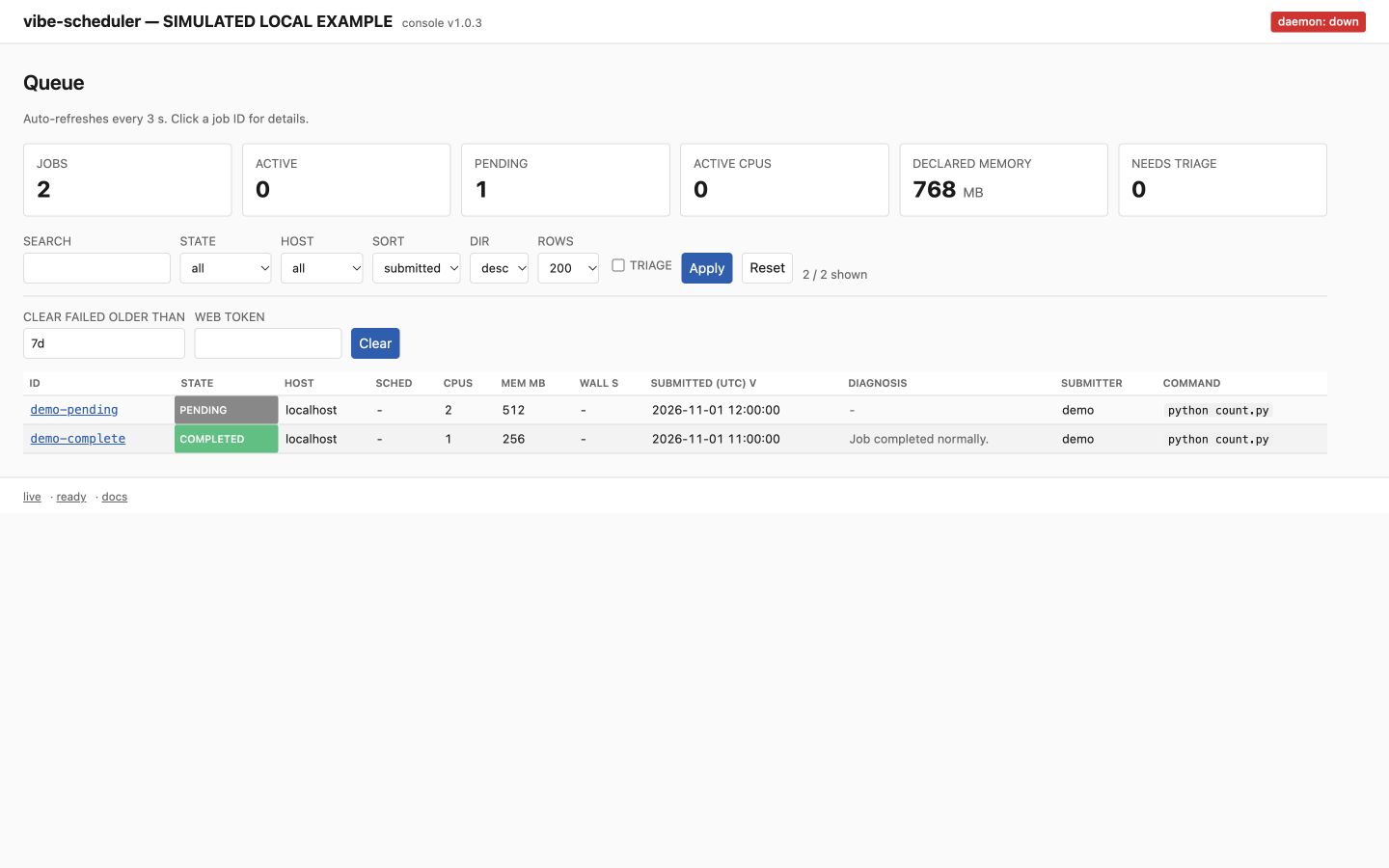
The released UI, captured at 1440 × 900. “daemon: down” is expected here: this demonstration starts the web reader only. “completed” is fixture data, not evidence that a calculation or an end-to-end queue job passed.
Verify the application first
The capture uses release tag v1.0.3, source commit
ea42490538d6f0cf74572fa6df3214c14d996df5. A wheel was built from that
immutable source and installed into a disposable target directory, using an
existing Python environment for dependencies. All 158 installed application
files were checked against the tag. This is released-source application
coverage, not a claim about a downloadable macOS/Linux installer.
This captured 1.0.3 tutorial uses the former Python distribution name
vibe-queue. Current source names the distribution vibescheduler, with
vibe-queue as a compatibility alias; the command remains vq. See
package installation.
These are the actual installed CLI’s version and help output:
$ vq --version
vq, version 1.0.3 "Meyer's Contract"

$ vq --help
Usage: vq [OPTIONS] COMMAND [ARGS]...

  vibe-scheduler (vq): submit and manage queued jobs on a remote machine.

  The former product name vibe-queue is deprecated, with no scheduled removal
  date. The command remains vq and the distribution remains vibe-queue.

Options:
  --version   Show the version and exit.
  -h, --help  Show this message and exit.

Commands:
  admin               Queue admin verbs: refresh registered envs, etc.
  audit               Print the RPC audit trail — every admin action...
  benchmark           Plan, run and analyze generic-versus-optimized...
  broker              Fleet broker (#64): place jobs on daemon hosts from...
  campaign            Artifact-aware calculation campaigns (#165).
  cleanup             Archive, delete, or restore terminal-state job...
  connector           The outbound connector to a relay-mode gateway...
The complete help transcript is
accessible text, not a reconstructed terminal screenshot. Check the source
provenance of the interpreter you intend to use as well as vq --version:
a development installation can share a release version string.
Prepare the isolated application
Reuse an authorized existing checkout with the release tag, and a Python 3.12+
environment that already has the web dependencies. From that checkout root,
choose its interpreter as DEMO_PYTHON. Do not update a live queue environment
for this example.
DEMO_PYTHON=/path/to/existing/web-environment/bin/python
DEMO_BUILD=$(mktemp -d)
mkdir "$DEMO_BUILD/source"
git rev-parse 'v1.0.3^{}' # must match the commit above
git archive v1.0.3 src/vq pyproject.toml README.md LICENSE | tar -x -C "$DEMO_BUILD/source"
uv build --wheel --out-dir "$DEMO_BUILD/wheels" "$DEMO_BUILD/source"
uv pip install --python "$DEMO_PYTHON" --no-deps --target "$DEMO_BUILD/site" \
  "$DEMO_BUILD/wheels/vibe_queue-1.0.3-py3-none-any.whl"
PYTHONPATH="$DEMO_BUILD/site" "$DEMO_PYTHON" -c \
  'import vq; print(vq.__version__, vq.__file__)'
The import must resolve inside the new site/vq directory, with version 1.0.3.
The source export contains package build inputs only; it is not another Git
checkout. The existing environment and normal vq launcher are unchanged.
Run and inspect
Keep offline_dashboard.py and
offline-queue.json together. They
are also present in this checkout under docs/examples/.
PYTHONDONTWRITEBYTECODE=1 PYTHONPATH="$DEMO_BUILD/site" "$DEMO_PYTHON" \
  docs/examples/offline_dashboard.py --root "$DEMO_BUILD/demo" --port 8766
Open http://127.0.0.1:8766/queue. The script refuses an existing --root,
sets separate home/config/state/scratch directories before importing the app,
removes inherited queue overrides, and disables fleet mode. It does not start
a daemon, execute the fixture commands, submit jobs or read a live queue.
Confirm the header says SIMULATED LOCAL EXAMPLE and console v1.0.3.
The table has one pending and one completed record, both on
localhost.Choose pending in the state filter and press Apply. Only
demo-pendingremains. Reset restores both rows.Inspect the resource columns: these are declared fixture values, not measured resource consumption. Leave the token and state-changing controls unused.
Stop the server with Ctrl-C. Remove only the disposable directory named by
DEMO_BUILD after preserving any capture you need. For a real supported job
workflow, continue with the submission tutorials; use your
operator’s actual host configuration and authentic inputs.
Reproduce the capture
Use the unmodified released application, the JSON fixture above and the same
script. Keep the queue’s default filters (all, submitted, descending,
200 rows), browser zoom 100%, viewport 1440 × 900 and the application’s default
appearance. Capture the whole viewport at /queue, including the simulation
label and version chip. Do not hover the version chip: its operational tooltip
is unnecessary for a tutorial. No camera or scientific rendering setting applies.
Input, script, CLI transcript and screenshot SHA256 values are recorded in
capture provenance. The fixture
is a synthetic teaching input authored for this walkthrough, not a replacement
for any historical scientific dataset. No animation is involved.