Figures without a display
The rendering and export commands on this page use the core install:
no [viewer] extra or browser is required. The validation steps additionally
need the qvf reference validator. Use these
commands in a batch pipeline or a figure script for a paper. The data and
geometry conventions are shared with the browser; the offscreen and browser rendering backends differ,
so a PNG is not a pixel-identical capture of your browser session.
One caveat separates the two halves of the page. PNG capture, video and the scene exporters render through VTK, which needs an offscreen OpenGL context even with no display attached. Terminal rendering and the vector and data exporters need nothing at all.
Setting up a headless host
vibe-viewer capture-selftest
renders a tiny built-in structure through the real capture path, checks the PNG is not blank, and reports the render backend. Exit 0 means capture works here; non-zero means a stage of the capture check failed. Read the reported stage and error before assuming the GL stack is missing. Run it before the first real capture on a new host, and as a healthcheck in a queue or CI job.
On a bare Linux container the usual fixes are a Mesa runtime and a virtual framebuffer:
apt-get install libgl1 libglx-mesa0 libxrender1 libxext6 libsm6 libglib2.0-0 xvfb xauth
PYVISTA_OFF_SCREEN=True xvfb-run -a vibe-view capture job.qvf -o structure.png
PYVISTA_OFF_SCREEN=True tells PyVista not to look for a window; set it in
the environment of any script that captures. If a GL context is impossible
on a host, vibe-viewer show and render_terminal still work, because they
never touch one.
vibe-viewer capture
vibe-viewer capture job.qvf -o structure.png                     # the structure
vibe-viewer capture job.qvf -s vol_dens_0 -o density.png         # a volume section
vibe-viewer capture job.qvf -s vol_mo_0 --isovalue 0.03 --colormap RdBu -o homo.png
vibe-viewer capture job.qvf -s bands -o bands.png
-s selects a section ID from vibe-viewer info FILE.qvf. The CLI
supports structures, stored volumes / basis.ao, vector, complex and series
fields, forces (the structure with its force arrows), electric properties
(the dipole arrow), Bloch orbitals (the opening orbital, with --part and
--isovalue), and bands; a volume.complex section takes --part real|imag|modulus
(default real) and --isovalue, and prints the part and level it drew; a
volume.series section takes --frame N, the slab counted from 0 (default
0), draws it on that slab’s trajectory frame when the series names one, and
refuses a slab outside the series; batch --volumes draws its first slab;
a volume.vector section is drawn as the browser’s arrows, prints how many
it drew, and ignores --isovalue; batch --volumes draws it the same way.
Other kinds
need the capture API or the browser export controls.
Volumes take --isovalue and --colormap. --size WxH sets structure and
volume image dimensions; the default is 900x600. Bands use their chart
renderer rather than the 3-D image-size setting, and draw their energy axis
in the browser’s saved Band / DOS energy unit. --publication renders a
structure or a volume section in the browser’s Publication view preset: the
scientific material on a near-white background, with a black outline around
every atom and bond. Isosurfaces and ribbons are not outlined in a headless
image; see outlines in the browser and headless.
--render draws a volume section as its isosurface or as a
volume, the browser’s volume mode off-screen: the
same capped grid, the same transfer function from the section’s hint or
the kind’s preset, so a figure and the viewer agree. The default, auto,
follows the section’s render hint and draws the isosurface when there is
none, so an archive without the hint captures exactly as before.
Replication and --isovalue apply to the isosurface only; a skewed grid
is resampled onto its axis-aligned bounding box, as the browser does.
Without -o, the PNG is written beside the archive as <stem>_<section>.png
(<stem>_structure.png for the structure); animate and export follow the
same rule with their own suffixes.
Signed volumes retain both lobe colours and the grid’s full voxel-vector geometry, including skewed grids and reversed axes, as in the browser viewer.
capture renders supported stored fields and the opening orbital of a
wavefunction.bloch section. It has no flag for evaluating a selected
orbital from a molecular wavefunction.gto section on demand; the
Python API can do that.
Outlines in the browser and headless
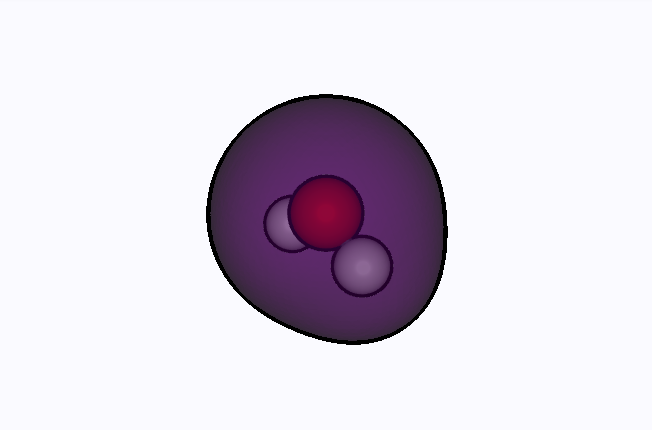
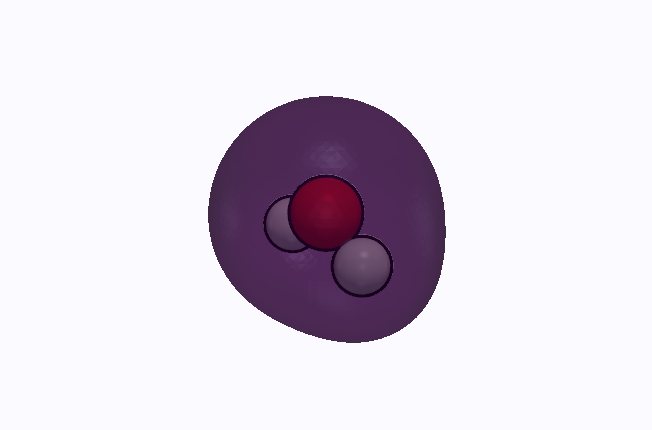
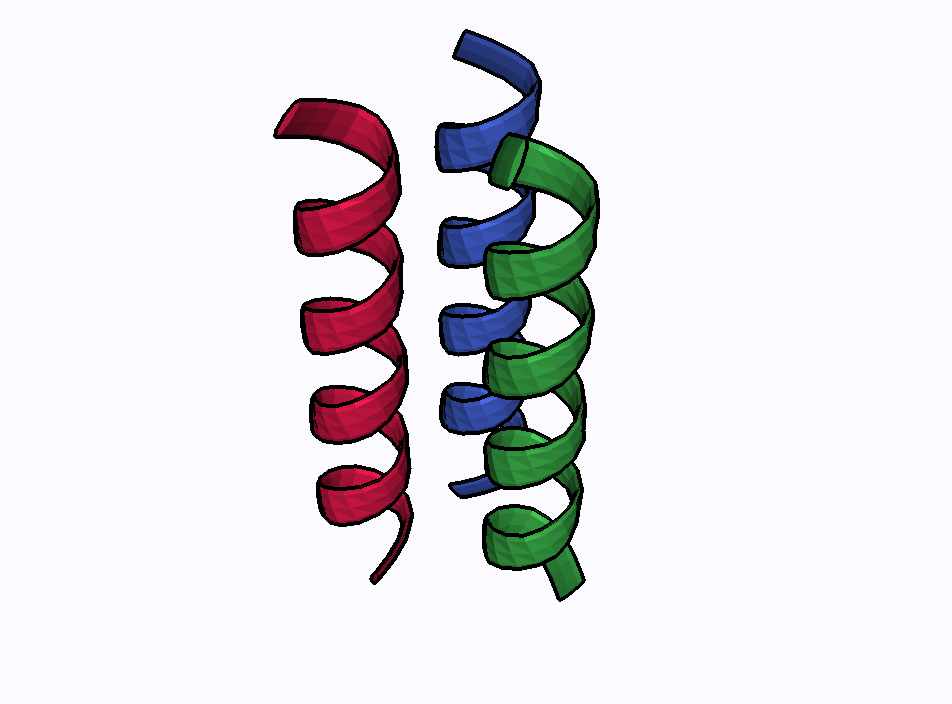
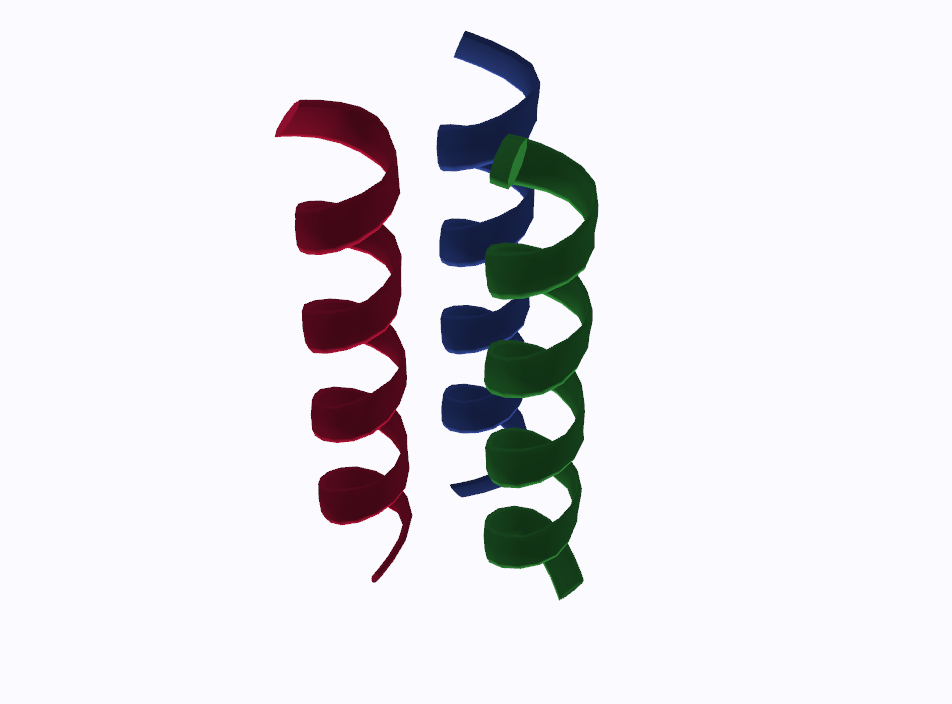
The outline of the Publication look comes in two kinds. Atoms and bonds get a black inverted hull, geometry the server adds, so it is the same in the browser and in every headless image. Isosurfaces and cartoon ribbons are outlined only in the browser, by a pass that runs on the graphics card for each frame, because their silhouettes and folds change with the view. A headless capture renders on the server, which has no such pass. The browser’s Export screenshot saves the frame the browser draws, outlines included, so take a figure with outlined isosurfaces or ribbons from the browser; see Screenshots.
The same two views, a water density at its default opacity and three helices
as a cartoon, in the browser (left) and from the headless capture with
--publication (right), at the same size and isometric camera:
Browser |
Headless capture |
|---|---|
|
|
|
|
docs/capture_silhouette_figures.py regenerates these four images, and
docs/bench_silhouette.py measures what the pass costs during a drag.
Keep a figure reproducible
Record the archive, section ID, viewer version, contour and output size
alongside the image. For example, after selecting a stored density section
whose ID is density:
vibe-viewer --version > figure-version.txt
vibe-viewer info calculation.qvf --json > figure-input.json
vibe-viewer validate calculation.qvf
vibe-viewer capture calculation.qvf -s density --isovalue 0.05 --size 1600x1000 -o density.png
Replace density with your actual section ID. Report the units supplied by
the producer and retain the original QVF; a PNG cannot recover the numerical
field. To compare two surfaces, keep their contour and view settings fixed.
For a runnable structure-only example, use the worked workflow.
vibe-viewer batch
vibe-viewer batch runs/*.qvf                       # one structure PNG per archive
vibe-viewer batch runs/*.qvf --volumes -o gallery/ # plus one PNG per volume section
vibe-viewer batch a.qvf --size 1200x800
Renders a gallery from many archives with the same view defaults, one PNG
per section, into ./vibe-view-gallery unless -o says otherwise. No
server is started. vibe-viewer dashboard PATTERNS... builds a grid preview
of many files instead, as one image or, with --html, one page.
Output names and partial failures
Without --volumes, batch runs/water.qvf -o gallery writes
gallery/water.png. With --volumes, it writes into gallery/water/,
including structure.png and <section-id>.png for each captured field.
The source directory is not part of the output name: inputs such as
run-a/water.qvf and run-b/water.qvf collide in one gallery. Use a separate
output directory for each run or distinct archive basenames. Existing image
names can be overwritten; use a fresh gallery directory to preserve a run.
The command continues after individual file failures and prints a final
rendered N/M file(s) summary. Exit status is unsuccessful when no files
render, but a partial batch can exit successfully. With --volumes, a file
counts as rendered when at least one image was written, not when every
section succeeded. For an automated figure set, check the summary and
expected images; do not use the exit status alone as proof of completeness.
Quote a glob to let the command expand it, for example
vibe-viewer batch 'runs/*.qvf' -o gallery. Only matched .qvf files enter
the batch; import loose inputs first.
Every headless image, from capture, batch, dashboard, the animate
frames and the Jupyter helper, is rendered the same way: the dark vibe-viewer
background and an isometric camera fitted to the scene. Only
capture --publication departs from that background, on purpose.
vibe-viewer animate
vibe-viewer animate opt.qvf                              # auto-detect: trajectory, reaction path, vibrations or orbitals
vibe-viewer animate neb.qvf --kind reaction              # reactant → transition state → product
vibe-viewer animate vib.qvf --kind vibration            # the first real (positive-frequency) mode
vibe-viewer animate vib.qvf --kind vibration --mode 7    # one normal mode, 1-based
vibe-viewer animate opt.qvf -k trajectory --fps 8 --format gif
vibe-viewer animate si.qvf  --kind turntable -o rotation.mp4
Without --format, the format follows the -o name: rotation.gif writes
a GIF and rotation.mp4 an MP4; any other name, or none, means MP4. A
--format that contradicts a .gif or .mp4 name is refused before any
frame renders.
MP4 needs ffmpeg on PATH; without it the command falls back to GIF when
Pillow is installed. --format frames writes the individual PNGs instead.
--kind auto, the default, takes the first of trajectory,
reaction.path, vibrations or wavefunction.gto it finds, then falls
back to a structure turntable. A geometry-only demo can therefore animate
without any calculated modes. --kind orbital sweeps every orbital of a
Gaussian wavefunction at --isovalue; it does not animate Bloch orbitals.
GIF export keeps at most one input PNG open at a time, including the MP4 fallback, so long sequences do not keep a file handle for every frame. Decoded frames stay in memory until GIF encoding finishes.
Export
vibe-viewer export job.qvf -f xyz -o geometry.xyz
vibe-viewer export job.qvf -f html -o viewer.html
vibe-viewer export job.qvf -f pov -o scene.pov
Twelve formats, none of which needs a display:
|
Writes |
Notes |
|---|---|---|
|
The structure |
CIF carries fractional coordinates with a periodic cell, or Cartesian Å coordinates for a molecule; no box is invented. |
|
A vibe-qc input script |
Reuses the archive’s own provenance (method, basis, functional) so the script reproduces the calculation, and carries the lattice so a periodic file exports a periodic system. |
|
A mesh of atoms and bonds |
glTF 2.0 with PBR materials, for any 3-D tool. |
|
A POV-Ray scene |
CPK spheres and bond cylinders with finish blocks, three-point studio lighting, the cell wireframe for a crystal. Render with |
|
A Blender Python script |
Builds the scene when run with |
|
A shareable structure page |
Opens without a Python server, but fetches Three.js from a CDN and therefore needs network access. It carries the geometry, not the full QVF analysis panels. |
|
Vector graphics |
CPK circles and bond lines, for journals that want line art. |
|
A vector PDF |
For |
Python exports preserve literal parameter text, including quotes, backslashes and line breaks in output names. Each line of a multiline calculation title remains a comment. The same formatting is used by the calculation panel and queue input generation.
XYZ and CIF exports replace line breaks in source filenames and supplied comments with spaces, keeping provenance on one comment line so it cannot be mistaken for geometry or CIF data when reopening the file.
Flat SVG and PDF figures fit the complete drawn atom circles, with their style-dependent radii and surrounding margin. Large atoms in space-filling figures keep their full outlines in both vector PDF output and the raster fallback used when matplotlib is unavailable.
Every export carries the connectivity the viewer shows: the archive’s explicit bonds when it has them, with their orders, otherwise the same covalent-radius inference. POV-Ray scenes draw a bond through a periodic cell face to the image it reaches; CML, the Blender script, the standalone HTML page and the flat SVG and PDF figures address atoms by index and leave such bonds out.
The browser’s Export geometry / scene menu offers the same formats.
Both CIF export paths use the same coordinate convention and write unique
atom-site labels separately from element symbols. A stored cell with
all QVF periodic flags disabled is treated as molecular. CIF cell parameters
do not preserve individual QVF periodic-axis flags. The
interactive High-Quality Raytrace Render is browser-only; from a script,
vibeview.raytrace.RaytraceEngine drives the same OSPRay path tracer when
the installed VTK ships it.
Tables and data
vibe-viewer table job.qvf                                  # what is tabulatable
vibe-viewer table job.qvf --kind atom_properties --format csv > charges.csv
vibe-viewer table job.qvf --kind wavefunction.gto --format json
vibe-viewer table job.qvf --kind vibrations --format csv > modes.csv
vibe-viewer info  job.qvf --json
Ten kinds are tabulatable: wavefunction.bloch (its orbitals at every
k-point), the three properties.* kinds (one row per number), forces (the force on each atom, F = −∇E),
hessian (its harmonic frequencies), vibrations (with IR, Raman and VCD intensities,
reduced masses, force constants and symmetries when the archive has them),
atom_properties, wavefunction.gto and excited_states. See the CLI reference for diff,
batch-compare and stats, and the Python API for the
same data as Python objects.
The capture API
Every function on the public SDK takes a path, bytes, a file object or an
open reader, and returns True on success:
from vibeview import capture_structure, capture_volume

capture_structure("job.qvf", "structure.png",
                  representation="space_filling", show_labels=True, replication=(2, 2, 1))
capture_volume("job.qvf", "vol_dens_0", "density.png",
               isovalue=0.05, colormap="viridis", opacity=0.6, size=(1600, 1000))
The lower-level module covers the chart and table kinds too. These take an
open QVFReader and auto-detect the section when none is named:
Function |
Output |
|---|---|
|
PNG |
|
PNG |
|
PNG |
|
HTML |
|
HTML |
|
HTML |
|
HTML |
|
HTML |
|
a dict describing the render backend |
from vibeview import QVFReader
from vibeview.capture import capture_bands, capture_dos, capture_scf_history

with QVFReader("crystal.qvf") as r:
    capture_bands(r, "bands.png")
    capture_dos(r, "dos.html")
    capture_scf_history(r, "scf.html")
capture_bands and capture_dos frame the energy axis the way the viewer
does: an all-electron archive opens on its valence states rather than
autoscaling over core levels thousands of eV below E_F. Pass
energy_window=(min, max) in eV relative to E_F for a specific window, or
auto_window=False for the full range. See
the bands and DOS panels. Both take energy_unit
("ev", "hartree" or "kcal_mol"; eV unless given), capture_energy_diagram
takes it with a Hartree default, and capture_bond_orders takes length_unit
("angstrom" or "bohr") for its distance column; the CSV that page offers
stays in Å. The API does not read the browser’s settings; the capture
command does.
capture_bands(r, "bands.png", energy_window=(-15.0, 10.0))
The chart kinds other than bands write interactive HTML through Plotly; for a PNG of one of those, save the figure with matplotlib from your own script, or screenshot the page.
To render an orbital that is not stored as a grid, evaluate it first:
vibeview.renderers.wavefunction.WavefunctionRenderer has evaluate_mo,
evaluate_density, evaluate_spin_density, evaluate_elf and
evaluate_nci. That module is below the supported surface, so pin the
version you script against.
The animation API
from vibeview import QVFReader
from vibeview.animation import (
    render_trajectory_video, render_reaction_video,
    render_vibration_video, render_orbital_animation,
)

with QVFReader("neb.qvf") as r:
    render_reaction_video(r, "neb.mp4", fps=5, format="mp4")
with QVFReader("vib.qvf") as r:
    render_vibration_video(r, "mode7.gif", mode=7, n_frames=60, fps=15, format="gif")
Each returns the output path, or None when the archive has no matching
section. render_turntable takes a PyVista plotter rather than a reader and
orbits the camera through a full rotation.
Recipes
A figure set for a paper
export PYVISTA_OFF_SCREEN=True
mkdir -p figs
vibe-viewer capture result.qvf -o figs/structure.png --size 1800x1200
vibe-viewer capture result.qvf -s vol_dens_0 -o figs/density.png
vibe-viewer capture result.qvf -s vol_mo_0 -o figs/homo.png --colormap RdBu
vibe-viewer export  result.qvf -f svg -o figs/structure.svg
Checks for an existing validation job
Install the reference validator and jq before running this recipe. In Bash, stop
on a failed command or pipeline so a later successful capture does not hide
a validation failure:
set -euo pipefail
vibe-viewer validate result.qvf
vibe-viewer diff result.qvf reference.qvf --json | jq '.delta_e_kcal_mol'
vibe-viewer capture-selftest && vibe-viewer batch results/*.qvf -o gallery/
Everything about one file, as text
vibe-viewer show result.qvf --all --plain > report.txt
That last one needs no GL at all, so it is the one to attach to a job’s log.