Jobs and live results
vibe-viewer is also a cockpit for calculations that are still running. It can watch an archive as a calculation rewrites it, list a vibe-scheduler daemon’s jobs and pull finished ones straight into the viewer, submit the structure on screen as a new job, and follow that job’s checkpoints until it settles.
Two layers, which you can use separately:
Live reload watches a file. It needs nothing but the viewer.
The vq Job Manager talks to a queue. It needs the
[queue]extra and vibe-scheduler itself; Queue integration covers the install and why that extra is unusual.
Neither needs vibe-qc, with one exception noted below. For jobs on a SLURM or PBS cluster, which the panel does not submit to directly, see Clusters and remote machines.
Live reload
Switch on Auto-reload on file change in the Display card. The open file is then polled in the background, every five seconds, and reloaded whenever its manifest fingerprint changes. Auto-reload needs a persistent file on the server’s filesystem; an uploaded or converted in-memory reader has no file to watch, and the control reports that limitation.
The watcher avoids common mid-write and unchanged-file reloads:
Content, not timestamps. The file is fingerprinted from its manifest, one digest per section. A
touch, or a rewrite that produces identical bytes, does not reload.A settle delay. Once the file starts changing, the watcher waits for half a second of quiet before reading it, so a writer streaming a large archive is not observed mid-copy.
A mid-write hold. If the file was a valid archive and momentarily is not (a zip’s central directory lands last), the watcher holds and retries rather than reloading a corrupt file.
What gets reloaded follows a per-section diff of the manifest. When only chart-panel sections moved (an SCF history growing, a spectrum updating), just the open panel refreshes and the 3-D scene, your camera and your section selection are untouched. When anything structural moved (atoms, sections added or removed, a volume or a trajectory), the scene rebuilds with your camera kept and the section you had open restored if it still exists. If you are parked on the last frame of a growing trajectory, the reload keeps you on the head as frames arrive, so a live optimisation plays forward on its own. The status bar names the sections that moved.
This is change detection, not strict validation of every payload on every poll. The fingerprint uses the manifest and its declared member hashes; changing payload bytes without updating the manifest is not a supported producer update. Use strict validation when you need an integrity verdict. A permanently damaged rewrite can remain on hold, so an unchanged screen alone does not establish that the calculation is still running or that its latest output is valid.
Streaming checkpoints
A producer can rewrite a live snapshot of the archive as it runs, carrying a
run_status in its provenance, a monotonic checkpoint sequence, and a
partial flag on sections it is still growing. vibe-qc does this for a job
started with checkpoint_qvf=...; the contract is in the QVF specification.
The viewer surfaces the stream:
An app-bar chip follows the status: it pulses running, with the sequence number, the iteration and the latest energy from the newest checkpoint, then settles green converged or red failed, and the status bar announces the finish.
A section the producer is still growing is badged streaming in the sidebar and reloads in place.
When
run_statusleaves running, the checkpoint you are watching is the settled result. Nothing has to be fetched separately.
The vq Job Manager
Open it from the server icon in the app bar. The panel slides in from the right and stays available while you work.
Each row is one job: a colour-coded state chip (pending grey,
running blue, suspended amber, completed green, failed, killed
and interrupted red, anything unknown grey), the job name or short id, the
elapsed time, and an open action that fetches a completed job and loads
its archives. The strip at the top summarizes the queue: a green or red dot
for daemon health, the host and vq version, the capacity in CPUs and
concurrent jobs, and the current load.
Live monitor widens the list from completed jobs to every state and
auto-refreshes every five seconds. The magnifier on a row pins a detail card
above the list with the job’s state and the tail of its stdout and stderr,
which advances with the queue while the monitor is on. Fetch results
into sets the directory finished jobs are pulled to, vq-fetched/ under
the viewer server’s launch directory by default; opening a completed job runs vq fetch
under the hood and opens its QVF archives and ORCA calculation datasets.
Watch live, the eye icon on a running job that has written a checkpoint, opens that job’s checkpoint archive and turns auto-reload on for you. You never need to know the path.
Without the extra, the panel and the overview strip show a notice naming the install command rather than a blank, and a dead daemon is reported as a dead daemon, not as a missing package.
From the command line:
vibe-viewer from-vq JOB_ID                   # fetch one job's archives and open them
vibe-viewer from-vq JOB_A JOB_B -o results/  # several, into a directory
from-vq talks to the local queue, recursively finds .qvf files and
starts a browser server; it does not import native ORCA results as the Job
Manager does. Multiple job IDs are attempted independently, so inspect the
per-job messages: one failed fetch does not prevent other jobs opening.
Use -o to select a server-side destination and --no-browser for a remote
server reached through a tunnel. For fetch-only work or a remote queue,
use vq fetch HOST JOBID and inspect the returned directory.
Submitting from the viewer
Choose Calculation engine → ORCA to prepare and submit a native ORCA input. The ORCA tutorial covers preview, saving, local vq setup, resource budgets and opening results. The remaining instructions in this section describe the vibe-qc engine.
With a structure on screen, set the method, functional, basis, charge,
multiplicity and calculation type in the Calculation Parameters panel
(see Building and editing),
then Submit to vq cluster. The viewer generates the input, submits it
with a job name derived from the file and method and a vibe-view tag, and
opens the Job Manager with the live monitor on, so the new job appears
immediately. Stream live checkpoints, on by default, makes the job
watchable as soon as it starts.
If the vq import is unavailable but vibe-qc is installed, a generated script runs in the launch directory; a container runs beside its payload and settles there. The status line reports the output location. A queue submission error does not trigger this fallback. See submission routes and resources.
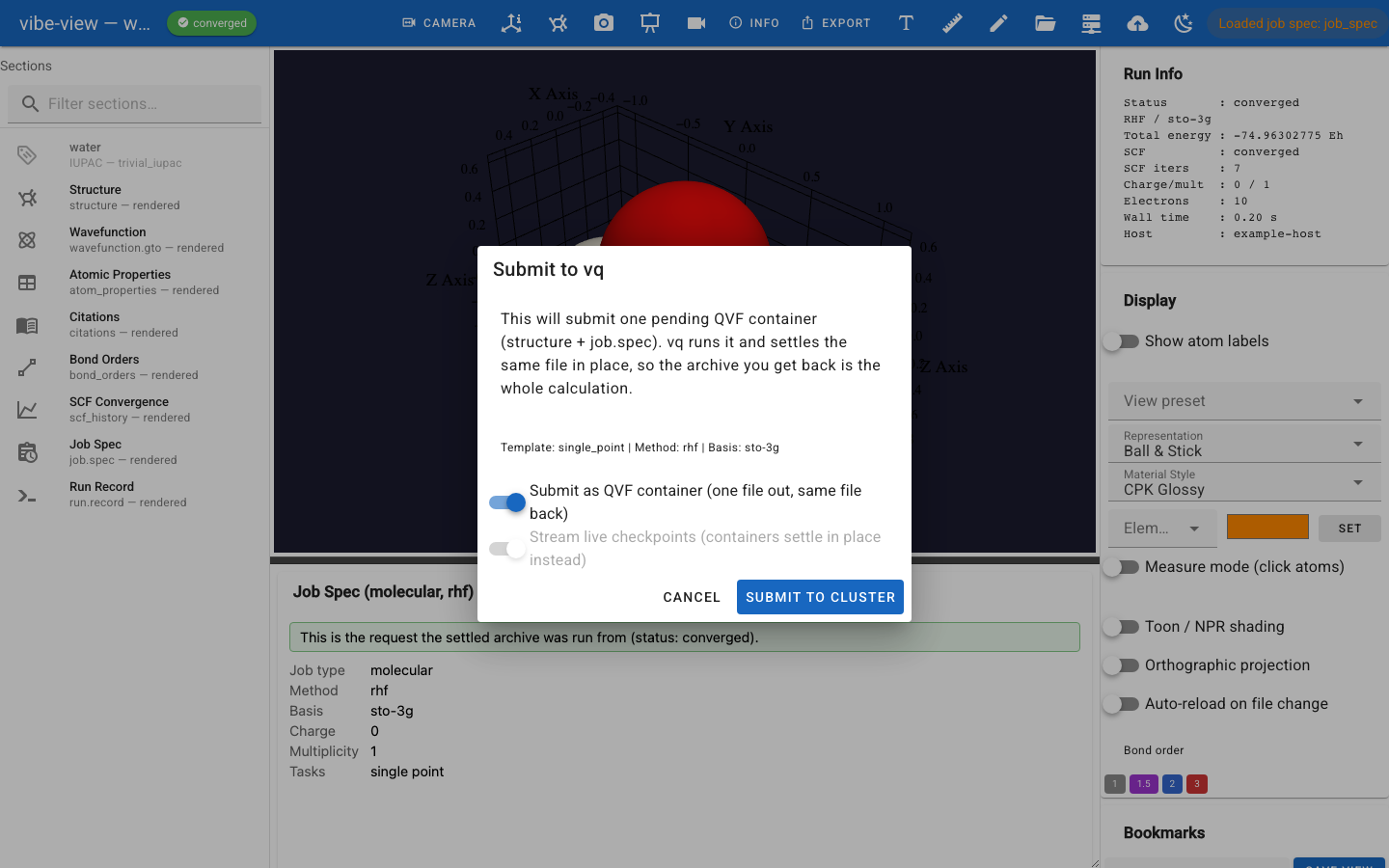
The submit dialog, with the container switch on.
QVF containers
Leave Submit as QVF container on and the payload is a single pending
archive instead of a generated script: the structure on screen plus a
job.spec section (method, basis, functional, charge, multiplicity), with
its run status set to pending. The queue recognizes the suffix and runs
the container in place: results, the full log, the citations and the system
manifest all land inside the same file, and its status becomes converged
or failed. The Job Manager’s open action then loads that settled archive
with its Job Spec and Run Info panels intact.
The queue runs a container on a vibe-qc program registered with it (see
vq programs) and pins the submission to that runtime’s git revision. The
viewer chooses the program: the one named by the VIBEVIEW_VQ_PROGRAM
environment variable if set, otherwise the registered program whose
environment is the one running the viewer, otherwise the only registered
vibe-qc program. Without the variable only vibe-qc programs count, which vq
identifies by the module its import check loads (vibeqc); the queue’s own
runtime and other registered environments are never chosen. When none or
several qualify, the status line says so and nothing is submitted.
Why you would want it: the request travels with the numbers, so a result
retains its declared inputs and recorded runtime provenance; one file moves each way instead of a
directory; and nothing has to be reassembled from sidecars afterwards. The
job.spec payload is declarative data, never code: running a container
never executes an embedded script.
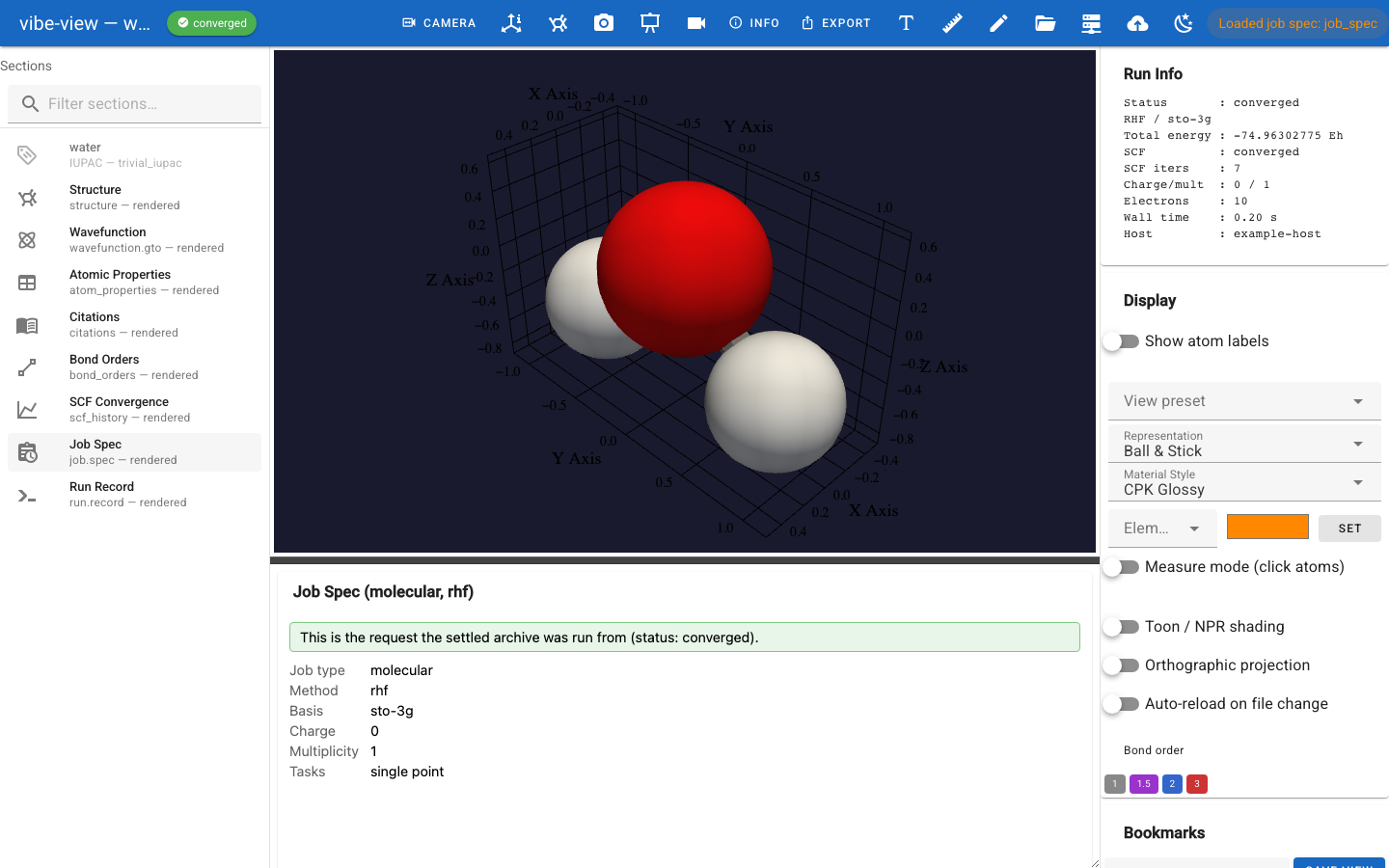
The same container after it ran: results, the executed spec and the log, in one file.
This is the one place vibe-qc matters. Writing a pending archive is a producer action, and the viewer does not depend on the producer, so the switch is disabled when vibe-qc is not importable next to vibe-viewer; the viewer then submits its generated script and says so in the status line. Streaming checkpoints is a script-mode option; a container settles in place instead of emitting a separate checkpoint file.
A container opens like any other archive, in every surface: a pending one
shows an amber chip and a Job Spec panel saying it has not run yet; with
auto-reload on, the chip follows the file through running to its terminal
state. vibe-viewer show job.qvf --info prints the lifecycle without a
display.
From Python
The watcher is a version-specific submodule API; pin the viewer version
for scripts that use it. A tracker needs repeated polling: the first call
after a file changes starts the settle delay and normally returns None.
For example, poll until interrupted:
import time
from vibeview.file_watcher import QVFChangeTracker

tracker = QVFChangeTracker("job.qvf")  # settle_delay=0.5 seconds
try:
    while True:
        event = tracker.poll()
        if event:
            print(event.changed_sections, event.added_sections, event.removed_sections)
        time.sleep(0.5)
except KeyboardInterrupt:
    pass
Alternatively, use a background watcher with a callback that receives the path. Keep the main process alive and stop the thread when finished:
import time
from vibeview import info
from vibeview.file_watcher import watch_qvf

def on_reload(path):
    print(info(path)["scf_energy_eh"])

watcher = watch_qvf("job.qvf", on_reload, interval=5.0,
                   on_event=lambda event: print(event.changed_sections))
try:
    while True:
        time.sleep(1)
except KeyboardInterrupt:
    pass
finally:
    watcher.stop()
Callbacks run on the watcher thread. Hand UI work back to the UI’s event loop rather than updating widgets directly from the callback.
A QVFChange carries the changed, added and removed section ids,
manifest_meta_changed (true when a non-section manifest key moved, such as
a streaming job’s status flipping to converged) and is_qvf (false for a
file tracked by whole-file hash because it is not a parseable archive).
The streaming provenance is on the reader:
from vibeview import QVFReader

with QVFReader("checkpoint.qvf") as reader:
    print(reader.run_status)
    print(reader.checkpoint_info)
    if reader.has_section("traj0"):
        print(reader.section_is_partial("traj0"))
A reader is a snapshot of the archive it opened. Reopen it after a change to read the new checkpoint; the watcher does not mutate an existing reader. See the SDK ownership rules.