Terminal mode
vibe-viewer show and vibe-viewer tui render an archive as text: the 3-D
scene, the charts and the tables, drawn with Unicode braille characters and
24-bit colour in whatever terminal you are already sitting in.
The point is where it runs. The browser draws its interactive scene through
WebGL; headless PNG capture needs a server-side graphics context. A compute
node reached over SSH usually has no display server, no GL and no X
forwarding, and that node is exactly where a .qvf lands. The terminal rasterizer is pure NumPy: it
paints spheres, bonds, isosurface triangles and plot lines into a
depth-buffered pixel array and packs that array into braille glyphs.
Isosurface extraction uses VTK’s marching-cubes filter, which is pure
computation and opens no render window.
ssh compute-node
vibe-viewer show ~/scratch/job.qvf          # one frame, then exit
vibe-viewer tui  ~/scratch/job.qvf          # interactive
For a first run without a remote calculation, create the bundled geometry:
vibe-viewer demo -o terminal-water.qvf
vibe-viewer show terminal-water.qvf --labels
This file contains only a structure. The orbital and spectrum examples below need a calculated archive carrying those sections.
Two commands
|
|
|
|---|---|---|
Output |
one frame to stdout, then exits |
a full-screen interactive app |
Needs |
the core install: no display, no GL |
the |
Good for |
pipes, CI logs, scripts, a quick look |
browsing an archive section by section |
For the full-colour view, use a terminal with 24-bit colour and a font with
braille coverage. show --plain also works without colour support, but its
Unicode glyphs still need a suitable font. If the glyphs come out as
boxes, add --mode half (or press d in the TUI) and the pictures
switch to block characters.
vibe-viewer show
vibe-viewer show job.qvf                            # the structure
vibe-viewer show job.qvf --section vol_mo_3         # a specific section
vibe-viewer show job.qvf -s vol_mo_3 --isovalue 0.03
vibe-viewer show job.qvf --info                     # provenance and the section inventory
vibe-viewer show job.qvf --all --plain > frames.txt # every graphable section, no colour
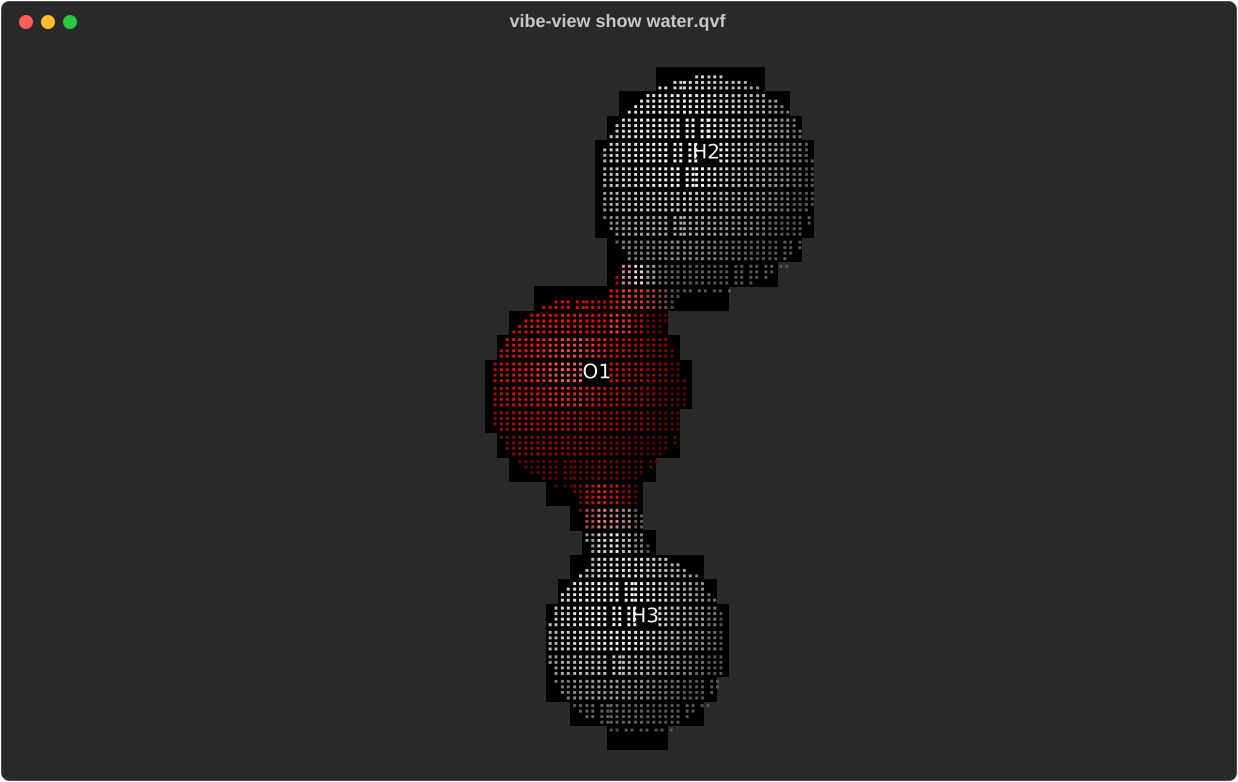
vibe-viewer show water.qvf --labels. Analytically shaded spheres and
split-colour bond cylinders, packed into braille cells two dots across by
four down, so an 80×24 terminal is a 160×96 pixel canvas.
Option |
Effect |
|---|---|
|
Section to render; the archive’s first structure by default. |
|
Render every graphable section in turn. |
|
Print the archive summary instead of a picture: provenance, run lifecycle, and every section with its status from the kind registry. |
|
Fix the character grid instead of asking the terminal. |
|
See Rendering modes. |
|
No colour, plain characters, for pipes and logs. |
|
|
|
|
|
Euler angles in degrees; the default is |
|
For volume sections; default 0.05. |
|
Supercell view. Only periodic axes replicate. |
|
Overlay atom indices. |
|
Zero-based frame of a trajectory, reaction path, normal-mode animation or volume series. |
|
Which normal mode |
|
For a reaction path or trajectory, draw the energy profile instead of the geometry. |
|
Choose the displayed spectrum envelope. |
|
Positive full width at half maximum for that envelope. |
|
Unit of the requested spectrum width; |
Frame indices start at zero; CLI normal-mode numbers start at one. For example, to inspect phase frame 10 of mode 7:
vibe-viewer show modes.qvf -s vibrations --normal-mode 7 --frame 10
vibe-viewer show spectra.qvf -s ir --lineshape gaussian --fwhm 10 --unit cm-1
Replace vibrations and ir with IDs from vibe-viewer info. show defaults
to normal mode 1; unlike animate, it does not automatically choose the
first positive-frequency mode. Spectrum broadening changes the displayed
envelope, not the stored sticks.
Colour escapes survive a pipe, so vibe-viewer show job.qvf | less -R keeps
the shading. Because it exits, show composes like any other command:
vibe-viewer show job.qvf --plain > frame.txt
watch -c -n2 'vibe-view show running.qvf'          # a crude live monitor
--info is the fastest way to find out what a calculation actually
produced:
Archive
path                   water.qvf
qvf version            1
producer               vibe-qc

Provenance
basis                  6-31g*
functional             PBE
method                 rks
scf_converged          True

Sections
id            kind              status    note
structure     structure         rendered
density       volume.density    rendered
homo          volume.orbital    rendered
wavefunction  wavefunction.gto  rendered
ir            spectra.ir        rendered
scf_history   scf_history       rendered
The status column comes straight from the viewer’s kind registry, so a
section the viewer cannot draw still appears with the honest reason.
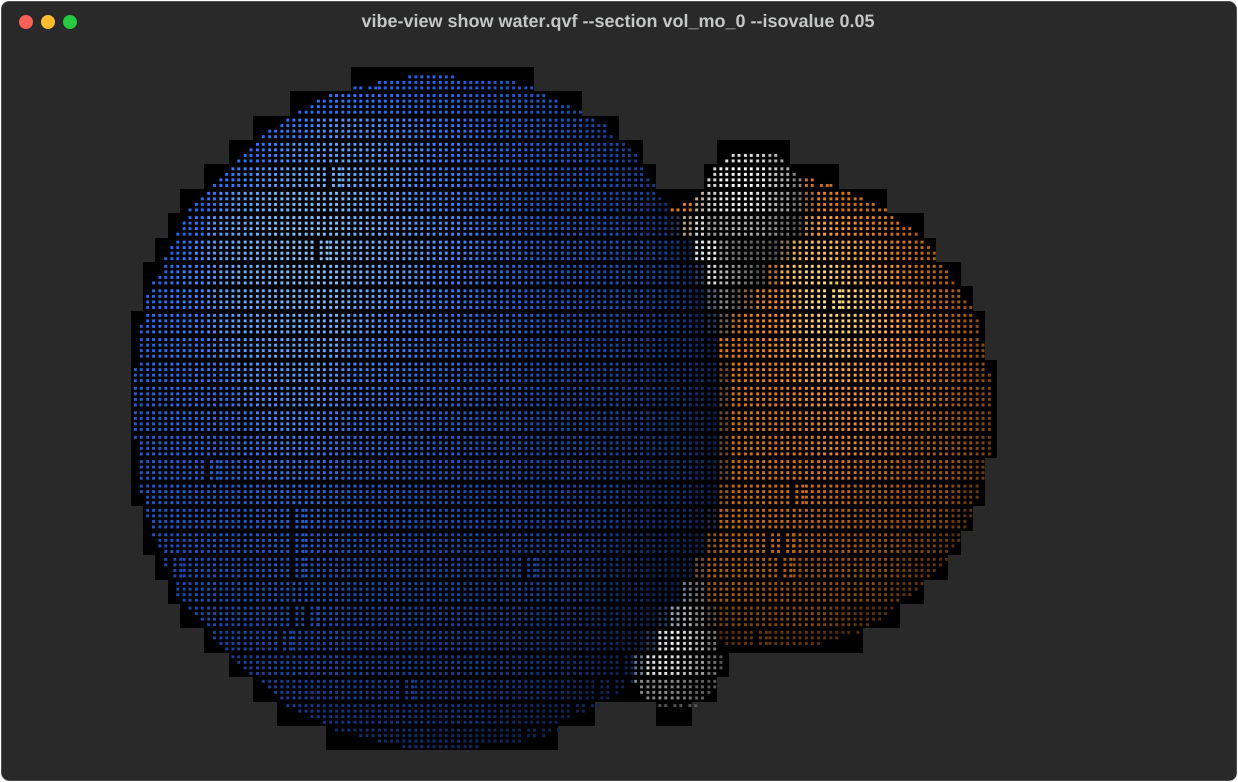
An orbital at isovalue 0.05 in licorice representation. Signed fields get both lobes, blue positive and red negative (the browser’s convention), depth-tested against the atoms.
vibe-viewer tui
The interactive viewer opens on the archive’s first structure (the first one
viewer_defaults.auto_open lists, else the first structure section) with the
section browser on the left, the viewport in the middle and a status line naming what you are
looking at. Press ? for the key map.

vibe-viewer tui water.qvf. The section browser lists every section with its
status, so one the viewer cannot draw is still visible, with its reason.
Keys
Key |
Action |
|---|---|
Tab / Shift+Tab |
next / previous section |
arrows or h j k l |
rotate |
H J K L |
pan |
+ / - |
zoom in / out |
r |
reset the camera and re-fit |
m |
cycle representation |
c |
cycle colour scheme |
b / u / # |
toggle bonds / unit cell / atom indices |
d |
switch between braille and half-block rendering |
x y z (X Y Z) |
replicate (un-replicate) along a, b, c |
o |
isosurface on / off |
i / I |
isovalue down / up |
n / p |
next / previous stored volume, or next / previous orbital while a wavefunction is active |
↑ / ↓, then Enter |
highlight and render a row of the wavefunction surface table |
D / S |
total density / spin density from the active wavefunction |
B |
choose spectrum broadening shape, width and units |
e |
cycle the orbital-energy unit: Eh, eV, kcal/mol (saved as a setting) |
Space |
play / pause an animation |
[ / ] |
step one frame |
< / > |
previous / next normal mode (drawn with a 0.6 Å peak atomic excursion, as in the browser; the status line shows it) |
g |
switch between geometry and energy-profile view (trajectories, reaction paths) |
s / t |
toggle the sidebar / the data table |
w |
write the current graphical frame as |
q |
quit |
The wavefunction surface table takes keyboard focus when activated. While
it is focused, ↑/↓ move through its rows and Enter renders the selection;
use h, j, k, l to rotate without moving the highlighted row. Tab and
Shift+Tab always change sections rather than traversing ordinary controls.
The keys are case-sensitive: s toggles the sidebar, while S requests spin
density; b toggles bonds, while B opens spectrum settings.
The w export contains ANSI colour escapes and replaces an existing file
with the same section-based name. It saves a graphical frame, not the data
pane or a reusable view session. For plain text or numerical data:
vibe-viewer show job.qvf --plain --size 100x30 > frame.txt
vibe-viewer table job.qvf --kind atom_properties --format csv > charges.csv
A TUI write needs permission to write beside the archive; shell redirection lets you choose another directory.
Clicking a row in the section browser selects it; there is no mouse rotation, because terminals report clicks rather than drags.

t opens the data table for the current section. On a structure that is the geometry: cell parameters when periodic, Cartesian coordinates, and the bond list with orders and lengths.
What each section kind shows
Drawn in 3-D: structure, trajectory, reaction.path, vibrations,
every volume.*, basis.ao, and wavefunction.gto in the TUI. A
volume.vector field is drawn as the surface where |v| is half its
95th-percentile value, since arrows do not read at this resolution, and a
volume.complex field as its real part’s two lobes. A volume.series is
drawn one slab at a time on that slab’s trajectory frame: show --frame N
picks slab N (counted from 0), and in the TUI [ / ]
and Space step and play the slabs as they do trajectory frames. Volumes
draw their isosurface over the structure; signed fields get both lobes,
unsigned density one surface. The browser’s volume mode has no terminal
counterpart, and a render: volume hint in the file is ignored here.
Trajectories and reaction paths also have an
energy-profile chart (g in the TUI, --chart for show).
A selected structure section draws itself, and in the TUI it becomes the
structure that volumes and frames are drawn over, as in the browser.
Animated sections use their own atom identities and frame positions, even when the archive has a different primary structure or no structure section. Display bonds are inferred from those frame atoms. Trajectories and vibrations retain the primary structure’s cell and periodic axes when available, as legacy display context; the primary atom list and explicit bonds are not borrowed. Reaction paths instead use their own selected-frame cell and dimensionality. A reaction path without a lattice is molecular and draws no cell, even when another section is periodic. Fixed and variable reaction cells both use the stored bohr column vectors converted to Å row vectors for display.
Charted: bands, dos.total, dos.projected, dos.coop, dos.cohp,
every spectra.* stick spectrum, scf_history, equation_of_state,
phonon_bands, phonon_dos, and scan.surface as a colour heat map. The
DOS grids are stored in eV relative to E_F = 0 and are displayed without
subtracting the optional absolute Fermi metadata again, matching the browser.
Projected DOS uses the producer’s channel labels. Bands follow the browser:
they are plotted relative to E_F whenever the file carries a Fermi level
(a stored 0.0 is the writer’s “no Fermi level” marker and plots absolute
energies). SCF convergence is |ΔE| on a log axis;
spectrum axes carry each kind’s native unit, with the Lorentzian envelope
named in the legend. Default Lorentzian half-widths match the browser: 5 cm⁻¹
for IR/Raman/VCD and 0.1 eV for UV-Vis/ECD; generic spectra use a width based
on their data span. Changing the terminal width does not broaden spectral
features. Signed intensities remain signed. Equation-of-state charts evaluate
the producer’s fitted
Birch–Murnaghan or Murnaghan parameters in eV/ų/GPa, using the same curve as
the browser. Computed points remain separate. Incomplete fit parameters leave
only the computed points.

An IR spectrum: the computed transitions as sticks, the envelope drawn under them and named, so the convenience is never mistaken for the data.

SCF convergence, |ΔE| on a log axis.
Tabulated: citations (BibTeX ready to paste), run.record (the
invocation, its verbatim input and the tail of its log), job.spec,
atom_properties, bond_orders, structure.symmetry, spectra.nmr,
spectra.epr, topology.qtaim, reaction.scheme (each step as an equation
over the archive’s species, with reagents, conditions and yield),
excited_states (each state with its energy in eV and nm, oscillator and
rotatory strengths, multiplicity, symmetry and orbital contributions, and
the NTO and density sections it links to); and, beside
their pictures, structure (geometry, cell, bonds and the species’ chemical
identity) and vibrations (frequencies and intensities).
The registry status describes support across the viewer, not a promise
that every surface has an implementation. forces, hessian,
properties.electric, properties.elastic, properties.dielectric and
wavefunction.bloch have no terminal graphical view; use
vibe-viewer table FILE --kind KIND for their numerical data or the browser
for their dedicated controls. show --all sweeps graphical sections, not
all scientific tables, and does not evaluate molecular orbitals on demand.
Use the interactive TUI’s wavefunction picker for those orbitals.
Any kind the viewer does not draw still appears in the section browser with the reason from the kind registry: not yet rendered is a different statement from unsupported.
Orbitals on demand
Activating a wavefunction.gto section evaluates a default orbital, the
frontier orbital when one is well defined, and opens a focusable surface
table on the right.

A molecular orbital in the TUI, evaluated from the basis and the coefficients rather than read from a stored grid.
↑ / ↓ highlight a row; Enter or a mouse click renders it.
n / p step through orbitals directly.
i / I lower or raise the contour; o hides it.
Total density (D) is the first row when the archive declares electron-occupation semantics. A natural-transition-orbital set declares transition weights instead, so the row is absent and the key explains the refusal; a legacy natural set without either declaration renders its orbitals but not a guessed density.
Spin density α − β (S) exists for an unrestricted wavefunction and is refused, with a reason, for a restricted one.
Every wavefunction set in the archive, canonical, alpha/beta, natural or localized, gets its own table and remembered selection. Canonical rows are identified by energy and occupation, natural rows by occupation or transition weight, localized rows by the atoms they sit on, because a localized orbital has no meaningful energy ordering. The status line always names the rendered row, its spin and the isovalue.
Orbital energies follow the same Energy unit setting as the browser (see The browser viewer), Hartree by default. e steps it through Eh, eV and kcal/mol, relabels the surface table in place without changing the selection, and saves the choice for both viewers. The data table (t) leads with the chosen unit and keeps a reference column beside it: eV next to Hartree, and the stored Hartree value next to any other unit. Its HOMO–LUMO gap is in the chosen unit, or in eV while the unit is Hartree. The archive itself stays in Hartree.
The browser’s other display units apply here too, read when the terminal
starts. Length unit (Å or bohr) sets the geometry table: cell edges and
their lengths, Cartesian coordinates and bond lengths, and the bond-order
distances. Band / DOS energy unit (eV by default, Hartree or kcal/mol)
sets the energy axis of bands, DOS, COOP and COHP charts, in vibe-viewer tui
and in vibe-viewer show. The DOS is rescaled with it, as in the browser. The
terminal has no key for these two; set them in the browser’s Settings.
The archive stays in Å and eV.
Sampling uses a terminal-sized 48³ grid; the first render of a large basis
takes a moment, and stepping back to a sampled row uses the cache. The
evaluator covers shells through l = 3 and marks a surface incomplete when
an orbital has significant g-or-higher weight. Explicit Gamma-point orbitals
in fully periodic 3D cells include neighboring atomic-orbital tails and
complex coefficients. A wavefunction.gto section’s nonzero k-points and
partially periodic cells are not evaluated, and a wavefunction.bloch
section has no terminal view: vibe-viewer table --kind wavefunction.bloch
lists its orbitals, and the browser draws them. Archives without explicit
k-point metadata retain central-cell sampling. The orbital evaluation limits
also explain why a single k-point block is insufficient for a total periodic density.
Biomolecules
An all-atom render of a solvated protein is a solid mass at terminal resolution. Use the backbone trace instead:
vibe-viewer show protein.qvf --representation backbone
vibe-viewer show protein.qvf --color-by chain
vibe-viewer show protein.qvf --color-by bfactor
backbone draws one point per alpha carbon, joined along each chain and
coloured by secondary structure: red helix, yellow strand, grey coil. Chains
are traced separately, so no bond is ever drawn from one chain’s C-terminus
to the next chain’s N-terminus. bfactor ramps blue to red across the
temperature factors, as the browser does: an atom with no b-factor is grey,
and a column with no variation, which is common, sits at the middle of the
ramp. The status line says when that happens. chain colours chains in
the same order as the browser. See Biomolecules for how the
metadata gets into the file.
Rendering modes
braille (default) packs a 2×4 dot matrix into every character cell: eight times the geometric detail of block characters, at the cost of one colour per cell, the average of what the eight dots cover. Best for structures and isosurfaces, where shape carries the meaning.
half (--mode half, d in the TUI) splits each cell into two
independently coloured pixels. A quarter of the vertical resolution, but two
true colours per cell: better for heat maps and anything where colour is the
data.
Charts follow the chosen mode too. The relaxed-scan heat map uses half-blocks unless a mode is chosen explicitly.
Consistency with the other surfaces
Element colours and radii come from the same functions the browser viewer and every PNG capture use, including any per-element override you have set in the browser’s settings, so a terminal frame and a screenshot of the same archive agree on what carbon looks like. Periodic systems follow the same rules as the 3-D renderer: cell edges only along periodic axes, and bonds across a cell face drawn to the nearest periodic image rather than stretched across the box.
That last rule matters more than it sounds. A periodic bond list stores the in-cell index pair, so graphene’s 1.42 Å bonds are listed at separations of 2.84, 3.76 and 5.68 Å. Drawing those endpoints literally produces a hairball; filtering by length deletes real bonds.
From Python
render_terminal is on the public SDK, next to the PNG capture functions:
the same renderers, a string instead of an image, and no GL context.
from vibeview import render_terminal

print(render_terminal("job.qvf", size=(100, 30)))
print(render_terminal("job.qvf", "vol_mo_3", isovalue=0.03))

# plain=True drops the ANSI colour, for a log file
from pathlib import Path
Path("frame.txt").write_text(render_terminal("job.qvf", plain=True), encoding="utf-8")
It accepts a path, a file-like object or an already-open QVFReader, and a
reader you pass in stays open. Keyword arguments match the show flags:
mode, representation, color_mode, replication, isovalue,
rotation, show_labels, frame, normal_mode, chart. Unlike the CLI’s
--normal-mode, the Python normal_mode index is zero-based: pass 6
for mode 7. Spectrum settings are grouped in a dictionary:
print(render_terminal(
    "spectra.qvf", "ir",
    spectrum_options={"lineshape": "gaussian", "fwhm": 10.0, "unit": "cm-1"},
))
A section with no graphical form returns a short explanation rather than raising, so sweeping every section needs no pre-filtering by kind.
The layers underneath are importable for finer control:
vibeview.tui.show.render_section returns the cell grid before it is
stringified, vibeview.tui.plots builds charts, vibeview.tui.panes the
text panes, and vibeview.tui.scene with vibeview.tui.raster are the
scene builder and the rasterizer.
A runnable script covering all of it ships in the checkout:
python examples/terminal_mode.py job.qvf
python examples/terminal_mode.py job.qvf --plain
It branches on what the archive actually contains, so it is safe to point
at any .qvf.
Limits
No mouse rotation. Use the keys.
One colour per braille cell, so two differently coloured atoms sharing a cell blend. Zoom in, or use
--mode half.Large volumes contour on every isovalue change. A 100³ grid is quick; a 300³ grid takes a moment.
The text panes are read-only, except the wavefunction surface table. Use
vibe-viewer exportandvibe-viewer tableto get data out.
It is a reading tool: fast, low-resolution, no setup, works over SSH. For
publication figures use vibe-viewer capture or the browser’s
own export; for a native window, the desktop app.